Real-Time Dashboard: See Your Mess Data Live
The biggest lie in spreadsheet mess management: "Let me check the sheet and get back to you. " With MessMaster, you don''t need to check anything.
Contents6 sections
- Member: sees live balances, meal counts, and payment status without asking the manager.
- Meal manager: watches the mess operate in real time — who entered meals, which payments are pending, what costs were added.
Your available controls and calculations depend on your role, mess status, deployment, and current server data. This guide uses fictional examples and does not replace the values shown in the app.
Guide status: Labels, permissions, calculation rules, rates, costs, exports, and available controls can vary by deployment and mess configuration. Use the current screen as the source to check and verify saved records after important changes.
Before you start
- You are signed in to the correct mess.
- Your browser allows WebSocket connections.
- You understand that a loaded page shell can still have unavailable data.
How the dashboard works
The dashboard is not a polling system. It does not check the server every 5 seconds. Instead, it uses Socket.IO to maintain a persistent WebSocket connection. When data changes on the server, the server pushes the update to all connected clients in the same mess.
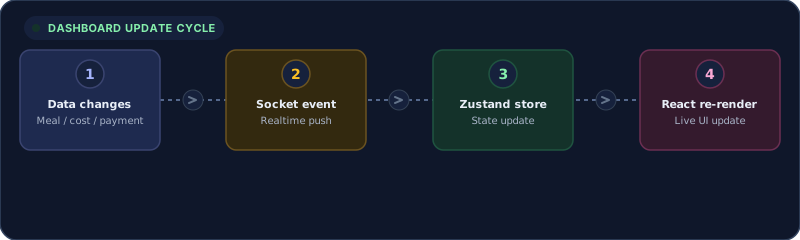
The update cycle is:
- Data changes — a meal, cost, or payment record is saved.
- Socket event — the server emits a realtime event over WebSocket.
- Zustand store — the client receives the event and updates the relevant store slice.
- React re-render — the UI reflects the new data immediately.
This means the dashboard shows the same state as the database, within milliseconds of a save. No manual refresh needed.
Socket.IO event types
The dashboard listens for four main event categories:
- Meal update — when any member enters or edits a meal, the tracker syncs across all connected clients.
- Payment status — when a manager approves or rejects a payment, the member sees the status change instantly.
- Member join — when a new member is approved, they appear in the member list for all connected users.
- Month transition — when a manager executes a month-end transition, balances and carry-over amounts update for everyone.
Authentication
Socket.IO uses the same JWT as HTTP requests. A single token authenticates both REST and WebSocket connections. No separate auth flow.
What updates automatically
Meal tracker
When any member enters meals for a date, every connected client sees the update. The daily total, monthly total, and per-member breakdown all refresh.
Payment list
When a manager approves or rejects a payment, the payment status changes for both the manager and the member. The balance updates accordingly.
Member list
When a new member joins and is approved, the member list updates for all connected users.
Notifications
Socket events trigger notification badges and toasts. You see a payment approval, a meal entry reminder, or a month-end notification without refreshing.
What you still need to refresh
Some data is not pushed in realtime and requires a manual page reload:
- Monthly statement PDFs — generated on demand, not pushed.
- Export files — CSV/Excel exports are generated server-side and require a download action.
- Settings changes — some configuration changes require a reload to take effect.
- After a disconnection — if your connection drops and reconnects, a manual refresh ensures you have the latest state.
The golden rule
If the page shell loads but data is missing, check the connection indicator. A blank total does not prove the mess has no data — it may mean the realtime connection dropped and the initial fetch failed.
Connection indicators and troubleshooting
The connection is fine but data is missing
- Check the connection indicator (usually a dot or icon in the header).
- If connected, refresh once.
- If still missing, check the selected mess and month.
- If the API returned an error, read the error message — it may indicate a permission or status issue.
The page shows zero totals
Refresh once and read the connection or API error. Confirm the selected month. A loaded page shell can still have unavailable or stale data.
The save button is slow
Do not submit repeatedly. Check history or the list for an existing record and wait for the current request to finish.
Realtime updates stopped
- Check your internet connection.
- Refresh the page — this re-establishes the WebSocket connection.
- If the issue persists, check whether the backend is running (the API health endpoint).
- If the backend is down, updates will resume when it restarts.
Performance and reliability
The realtime system is designed for reliability:
- Connection recovery — Socket.IO automatically reconnects on network interruptions.
- State reconciliation — on reconnect, the client fetches the current state to fill any gaps.
- Scoped broadcasts — events are scoped to the mess, so one mess's updates don't affect another.
- Rate-limited events — the server prevents event flooding by batching rapid changes.
When realtime is not enough
For critical financial decisions — month-end closure, payment approval, balance verification — always verify the saved record after any action. Realtime updates show you the current state, but the saved record is the source of truth.
Important: The realtime dashboard reflects live server data, but it is not a substitute for verifying saved records. Always confirm critical financial actions by reading back the persisted record. Your available controls and data depend on your role, mess status, and current server data.


